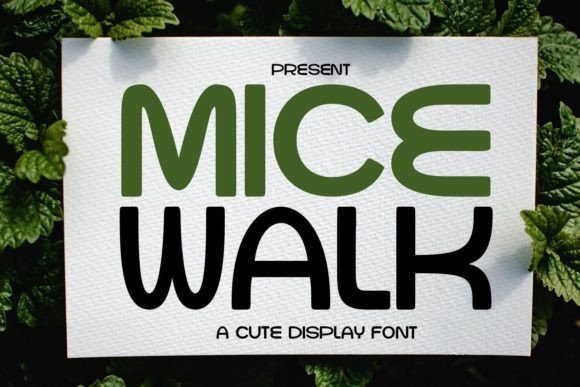
Micewalk: A Cute and Casual Display Font for Creative Projects
Micewalk is a display font that stands out for its cute and casual appearance, making it a popular choice for designers and creators looking to add a friendly touch to their work. Its simple letterforms enhance readability, which is particularly useful in contexts where clarity is important. Whether you're working on comic notes, titles, children's books, or creative projects, Micewalk offers a distinctive visual style that can complement a wide range of designs.
One of the key characteristics of Micewalk is its approachable aesthetic. Unlike more rigid or formal fonts, Micewalk has a playful feel that can evoke a sense of warmth and accessibility. This makes it ideal for projects aimed at younger audiences or those seeking to convey a relaxed, informal tone. However, its simplicity also means it may not be the best fit for all design scenarios, especially those requiring a more professional or structured look.
What Makes Micewalk Unique?
Micewalk distinguishes itself through its combination of simplicity and charm. The font’s letters are designed with rounded edges and gentle curves, contributing to its overall softness. This design choice helps make the text more inviting, especially when used in headings or short phrases. Additionally, the font maintains a high level of legibility, even at smaller sizes, which is crucial for ensuring that the message is clear and easy to understand.
Compared to other display fonts, Micewalk strikes a balance between creativity and functionality. While some fonts prioritize boldness or artistic flair, Micewalk focuses on readability without sacrificing personality. This makes it a versatile option for designers who want to maintain a clean and professional appearance while still adding a unique visual element to their work.
When Micewalk Is a Good Fit
Micewalk is particularly well-suited for projects that benefit from a friendly and approachable visual style. For example, in children's books, the font can help create a welcoming atmosphere that encourages engagement. Its simplicity also makes it an excellent choice for comic notes or labels, where clarity is essential. In these cases, the font’s casual nature aligns well with the content’s purpose and audience.
Another area where Micewalk excels is in personal or creative projects. Whether you're designing a custom greeting card, a DIY craft, or a social media post, the font can add a personal touch that feels authentic and expressive. Its ease of use and natural appearance make it a go-to option for those looking to enhance their work with a touch of personality.
Considerations and Limitations
While Micewalk offers many benefits, it may not be the best choice for every project. In more formal or professional settings, such as business reports, legal documents, or corporate branding, the font’s casual style might not align with the desired tone. In these cases, a more traditional or structured font would likely be more appropriate.
Additionally, because Micewalk is a display font, it may not be suitable for long blocks of text. Display fonts are typically designed for short phrases or headlines rather than extended reading. If you're planning to use the font in a larger body of text, it's important to consider how it will affect readability and user experience.
Comparing Micewalk to Other Fonts
When evaluating display fonts, it's helpful to consider how they compare in terms of style, readability, and versatility. Some fonts, for instance, emphasize boldness and impact, making them ideal for headlines or logos. Others focus on elegance or sophistication, which can be better suited for luxury or high-end branding. Micewalk falls somewhere in the middle, offering a balance between creativity and clarity.
Fonts like Quicksand or Nunito, for example, are often used in digital interfaces and web design due to their clean lines and modern feel. These fonts are highly readable and adaptable, making them a good alternative if you're looking for something that works well in both print and digital formats. However, they may lack the playful charm that Micewalk brings to a design.
On the other hand, fonts such as Comic Sans or Brush Script have a similar casual vibe but may not offer the same level of professionalism. While they can be effective for certain applications, they may not be as versatile as Micewalk in more varied design contexts. Ultimately, the choice of font depends on the specific needs of the project and the intended audience.
Best Practices for Using Micewalk
To get the most out of Micewalk, consider the following tips. First, use it in small doses. Since it's a display font, it works best for headlines, titles, or short phrases rather than large sections of text. This helps maintain visual balance and ensures that the font doesn't overwhelm the overall design.
Second, pair it with complementary fonts. Combining Micewalk with a more neutral or structured font can create a dynamic contrast that enhances readability and visual interest. For example, using a sans-serif font like Arial or Helvetica for body text while reserving Micewalk for headings can provide a clean and cohesive look.
Finally, test the font in different contexts. Before finalizing a design, try using Micewalk in various sizes, colors, and backgrounds to see how it performs. This can help identify any potential issues and ensure that the font meets the project's requirements.
Deciding When to Use Micewalk
Determining whether Micewalk is the right choice for your project involves considering the goals, audience, and context of your work. If you're aiming for a friendly, approachable tone, especially in creative or informal settings, Micewalk can be an excellent option. It adds a sense of warmth and personality that can resonate well with younger or more casual audiences.
However, if your project requires a more formal or professional appearance, you may need to explore other options. In such cases, fonts that emphasize structure, clarity, or sophistication may be more appropriate. The key is to match the font's characteristics with the overall message and intent of the design.
Ultimately, the decision to use Micewalk should be based on how well it aligns with your creative vision and practical needs. By understanding its strengths and limitations, you can make an informed choice that enhances the effectiveness of your work.